
Data Deletion Instructions
DATA DELETION INSTRUCTIONS
Last Updated: August 9, 2024
The VRS® Member Platform stores user-generated data, billing and payment data in the registered account each customer can create.
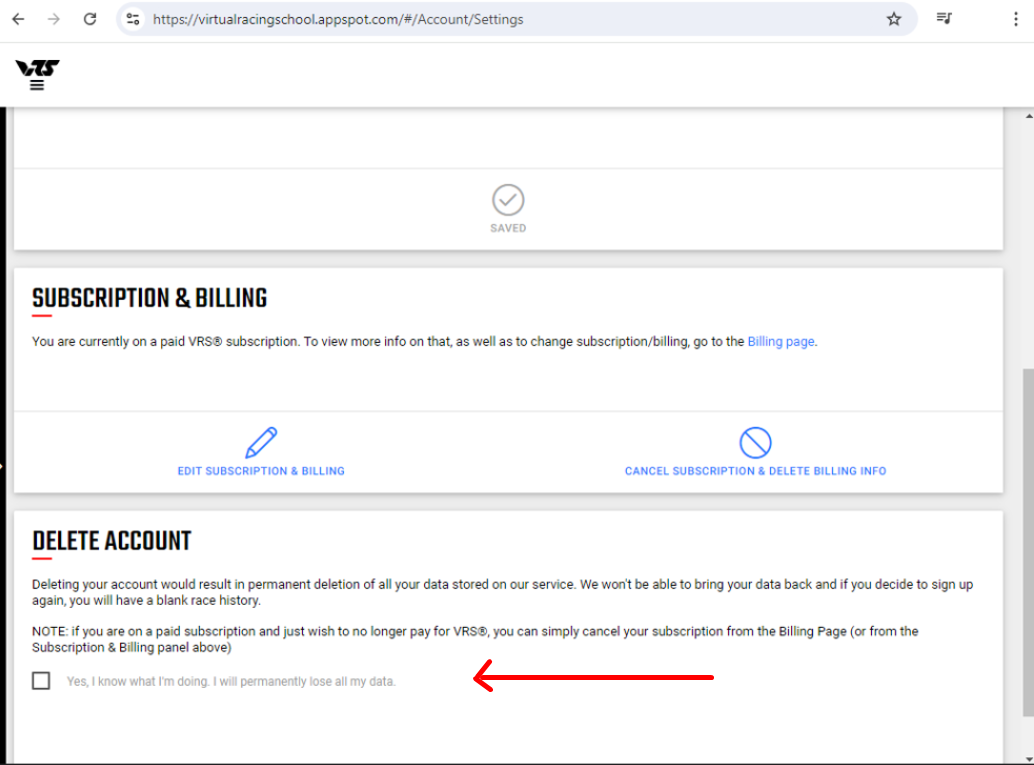
All of this data, with the exception of legally required data related to billing operations, can be deleted from the VRS® Member Platform through the Account Settings page:
Navigation to that page is available through the link above, or through the navigation menu under the Account section:

The bottom of this page includes an option to trigger delete the account and data deletion as described above. There are several prompts to confirm this isn't an accidental deletion:
After deletion is triggered, the data and the account cannot be restored - they are permanently removed from all records, with the exception of legally required data (e.g.: invoices).
If a customer has lost access to their account and wishes to delete it, they can contact us at info@vrs.racing for help with restoring access to their account. Once account ownership is confirmed and access is restored, the customer can delete their account.